Starting an AI-built app from a blank prompt is useful, but it is not always the fastest or most responsible path. Many business applications are variations on patterns that already exist: booking, search, provider profiles, admin review, availability, pricing, notifications, and role-based access.
Short answer: Buzzy Builder MCP lets MCP clients such as Codex, Claude Code, Cursor, and other agentic tools work with Buzzy semantic app definitions. Instead of asking AI to generate a large new codebase, a team can inspect and adapt an existing Buzzy app definition, then run the result on Buzzy's maintained app engine.
That is what makes the Short Stay to Care Connect example useful. The original app was a short-stay property rental template with clients, hosts, admins, property listings, availability, booking, and search. The adapted app, Care Connect, uses a similar operating pattern for a more sensitive domain: helping clients find and book carers.
The shape of the workflow is familiar. The meaning of the workflow changes. That is exactly where semantic app definitions matter.
Why start from a template instead of a blank prompt?
Blank prompts are good for exploration. Templates are better when the business pattern is already known.
The Short Stay app already had much of the structure a booking marketplace needs. It had clients looking for something to book, hosts offering inventory, platform administrators, availability, detail cards, search, pricing, and support pages. Those pieces are not care-specific, but they are structurally useful.
Care Connect needed a different domain model and a stronger governance posture, but it did not need to rediscover the basic idea of a marketplace booking flow. The faster path was to adapt a close template and change the semantics: what the entities mean, what the booking represents, what data is sensitive, what access rules matter, and what the user needs to trust before booking.
The visible before and after
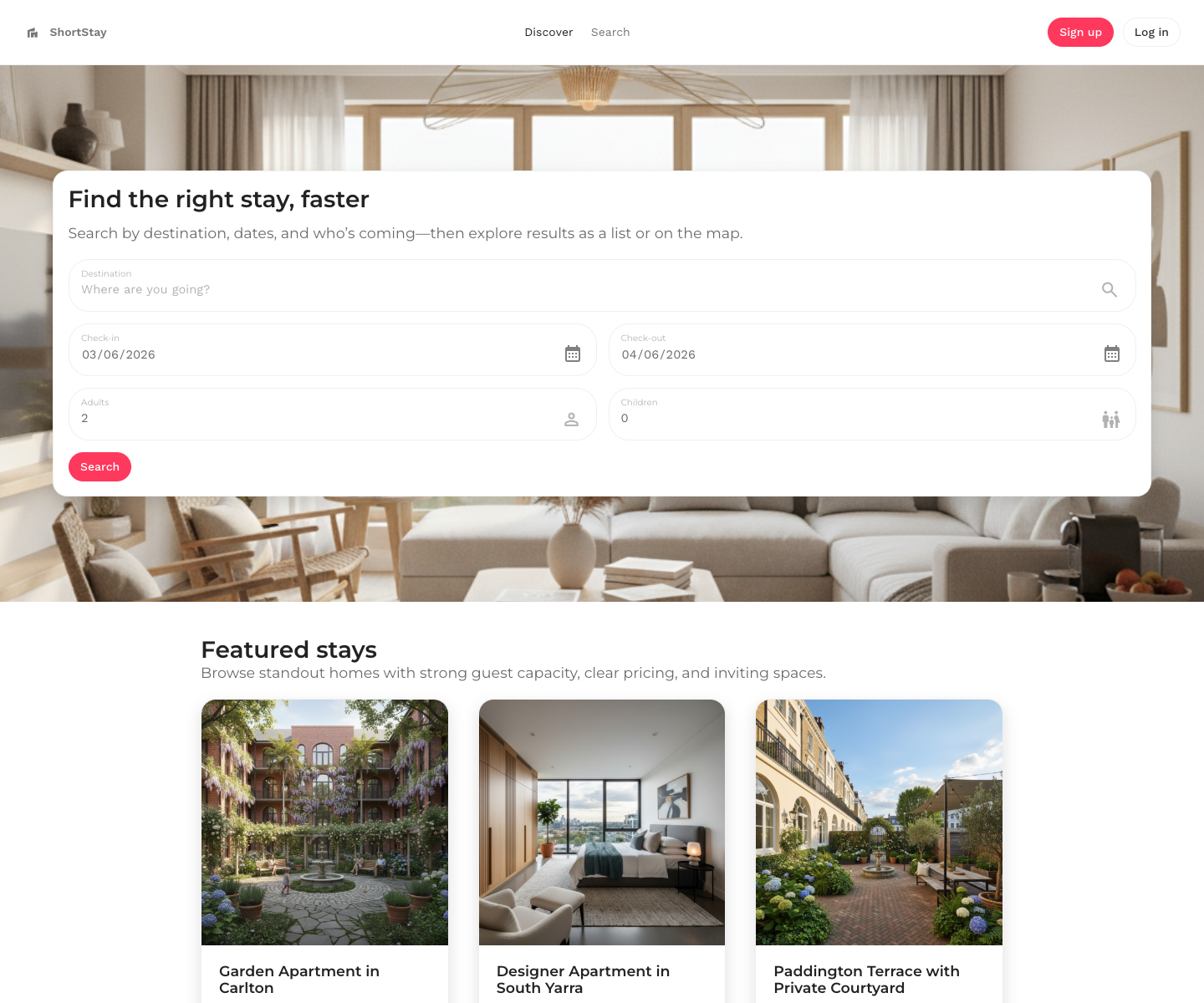
The public Short Stay runtime shows the original rental pattern: search by destination, dates, and guests, then compare featured stays with addresses, room details, and nightly pricing.
The adapted Care Connect runtime keeps the same broad shape, but the language and meaning change. The home page asks users to search by name, service, or location, then compare featured carers with service types, locations, and hourly starting prices.
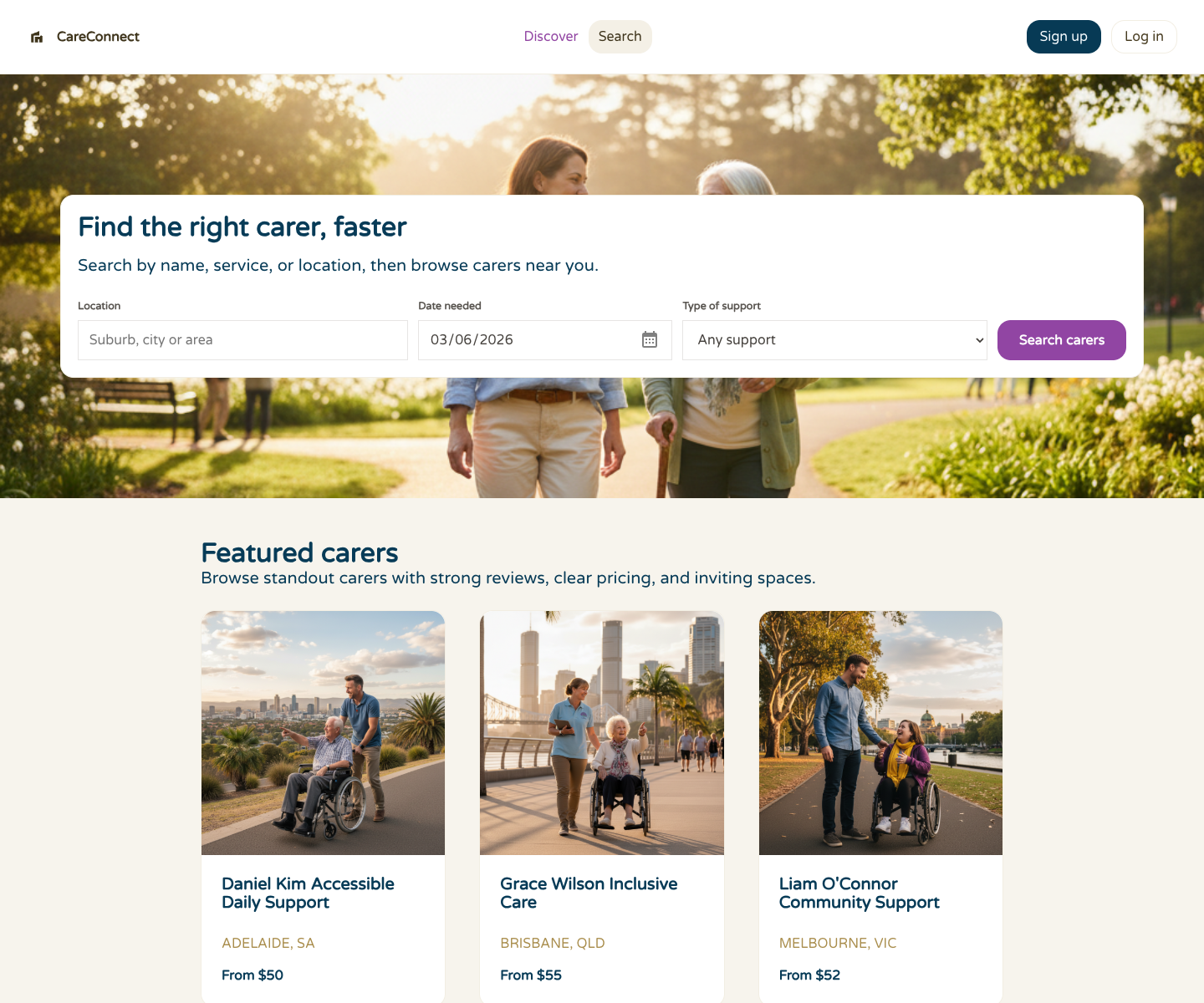
The important point is not that the two screens look related. The important point is that the underlying app definition can be adapted from one business pattern to another. The platform is not treating the app as a pile of source files. It is treating it as a structured application model.
What changed semantically?
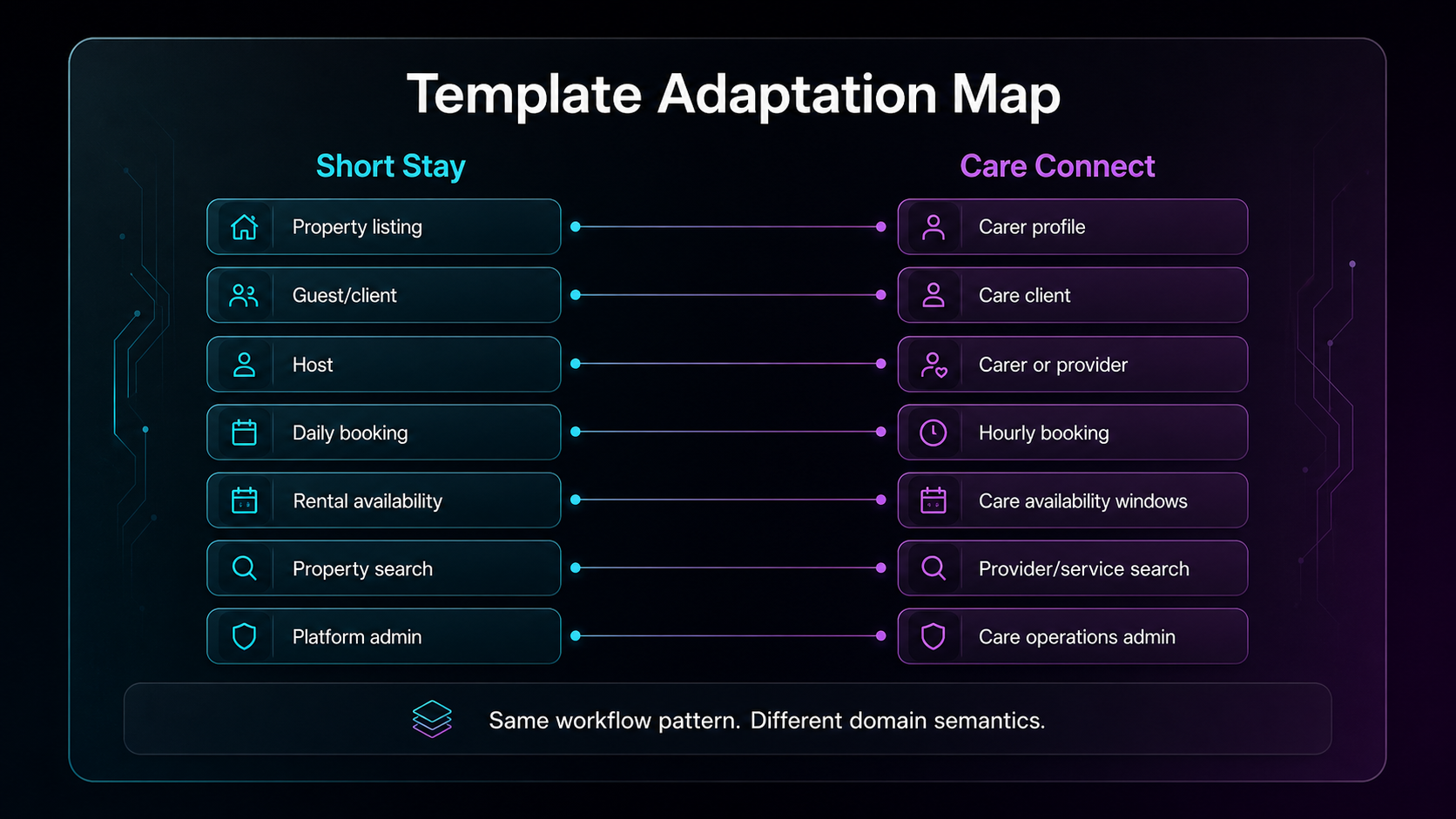
At a high level, the adaptation looked like this:
A property listing became a carer profile.
A guest or rental client became a care client.
A host became a carer or care provider.
A daily property booking became an hourly care booking.
Rental availability became care availability windows.
Property search became provider, service, and location search.
Platform administration became care operations administration.
Those changes are not just copy edits. A day-based property booking and an hour-based care booking behave differently. A home address and a care client record have different privacy expectations. A platform that supports care coordination needs to think harder about sensitive information, roles, field visibility, and review paths.
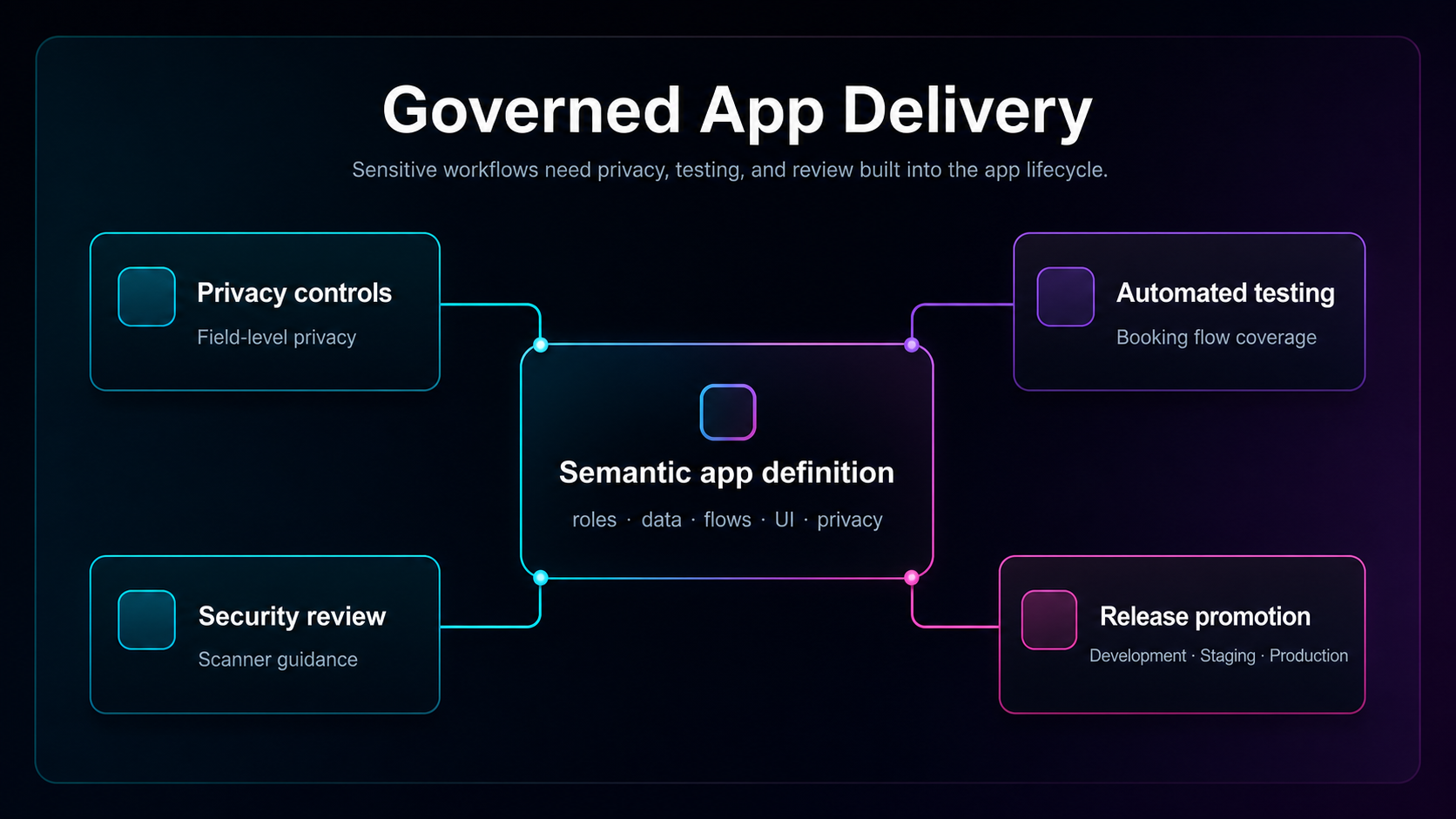
That is why the semantic definition is the useful control point. It gives the team a structured place to reason about data, roles, screens, workflows, privacy, and release behavior before the app reaches production users.
Where Buzzy Builder MCP fits
Buzzy has two MCP directions that are easy to confuse. Buzzy Custom MCP lets an app built with Buzzy expose its data, functions, and workflows to MCP-enabled assistants through governed interfaces. Buzzy Builder MCP brings MCP into the app creation workflow itself, so tools such as Codex, Claude Code, Cursor, or other agents can help generate and refine the semantic app definitions that power Buzzy apps.
In a Builder MCP workflow, the agent does not need to generate and maintain a large arbitrary codebase. It can work with the app definition as the durable artifact:
Connect the MCP client to Buzzy Builder MCP.
Pull down or inspect the source app definition.
Review the data model, screens, flows, roles, and settings.
Write the adaptation instructions locally with enough context to stay coherent.
Push structured changes back through Buzzy Builder MCP.
Review the generated app in Buzzy and test the key flows.
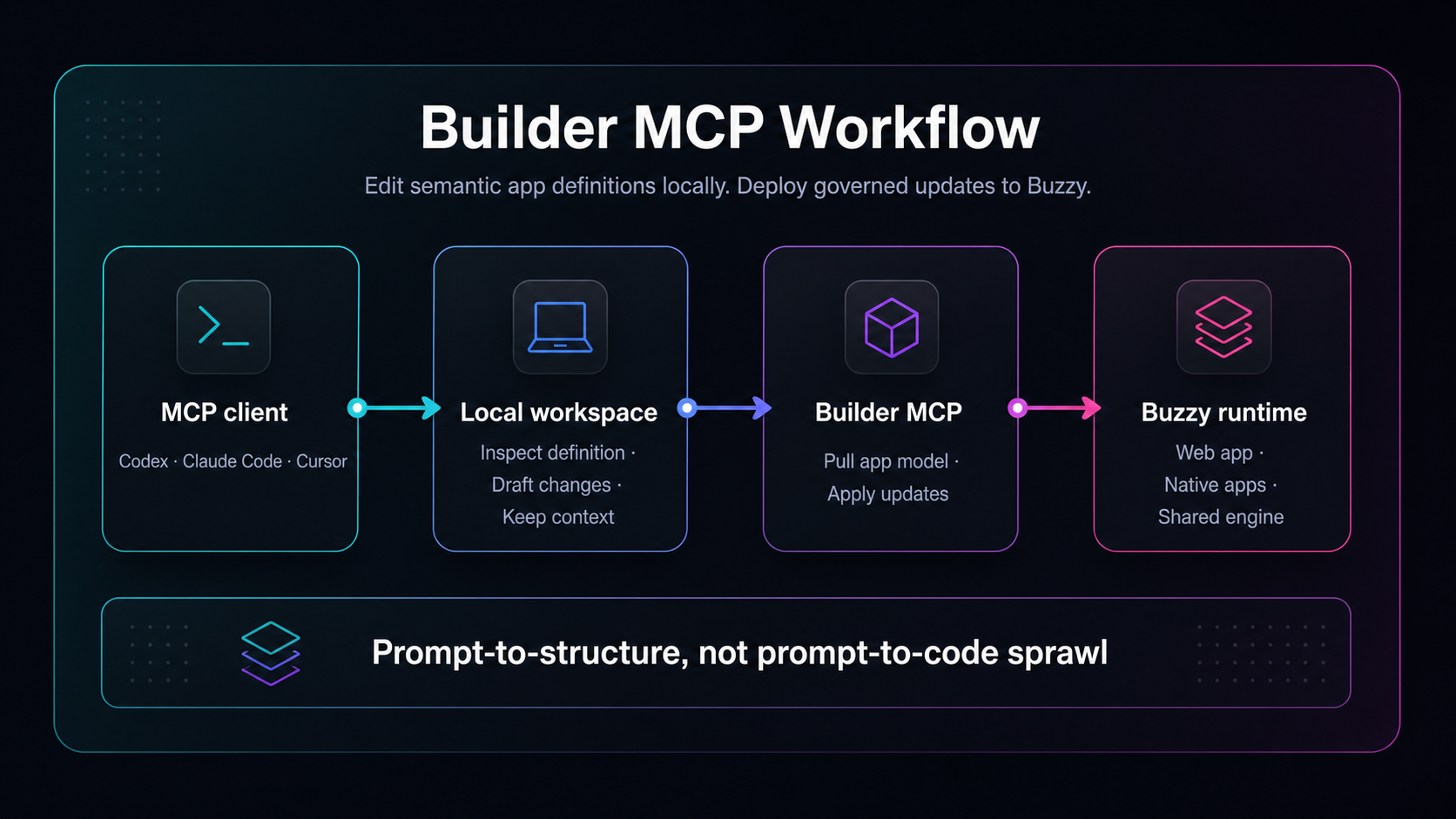
This is where the economics and maintainability become interesting. The agent can use the local machine's context window, filesystem, and planning loop to reason through changes. Buzzy remains the app platform that runs the definition, renders the app, and provides the governed runtime. The output is not another unsupported codebase for the team to own forever.
From property booking to carer booking
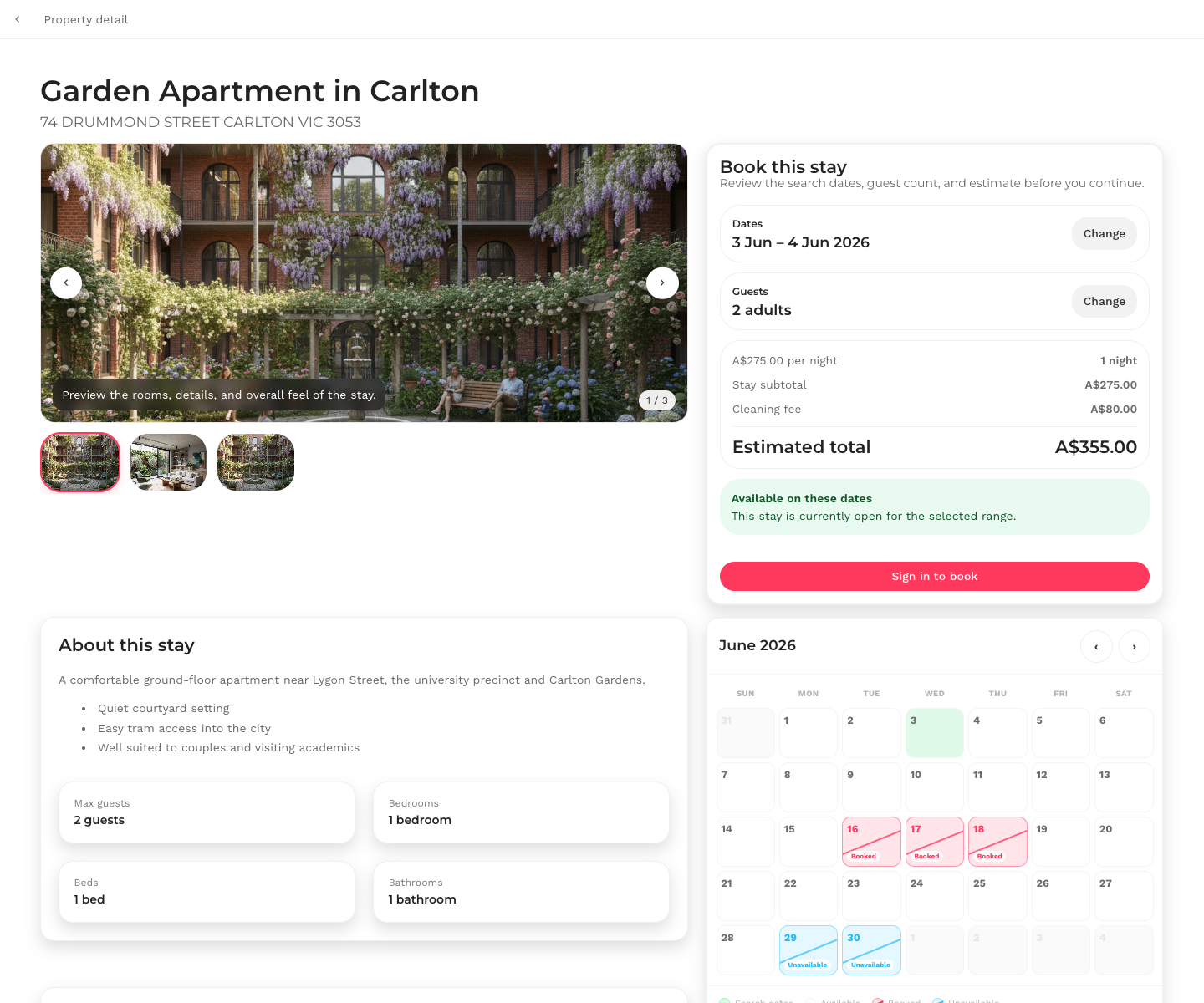
The clearest comparison is the detail flow. A Short Stay item opens into a property detail page with an address, gallery, booking panel, date range, guest count, nightly pricing, and an availability calendar.
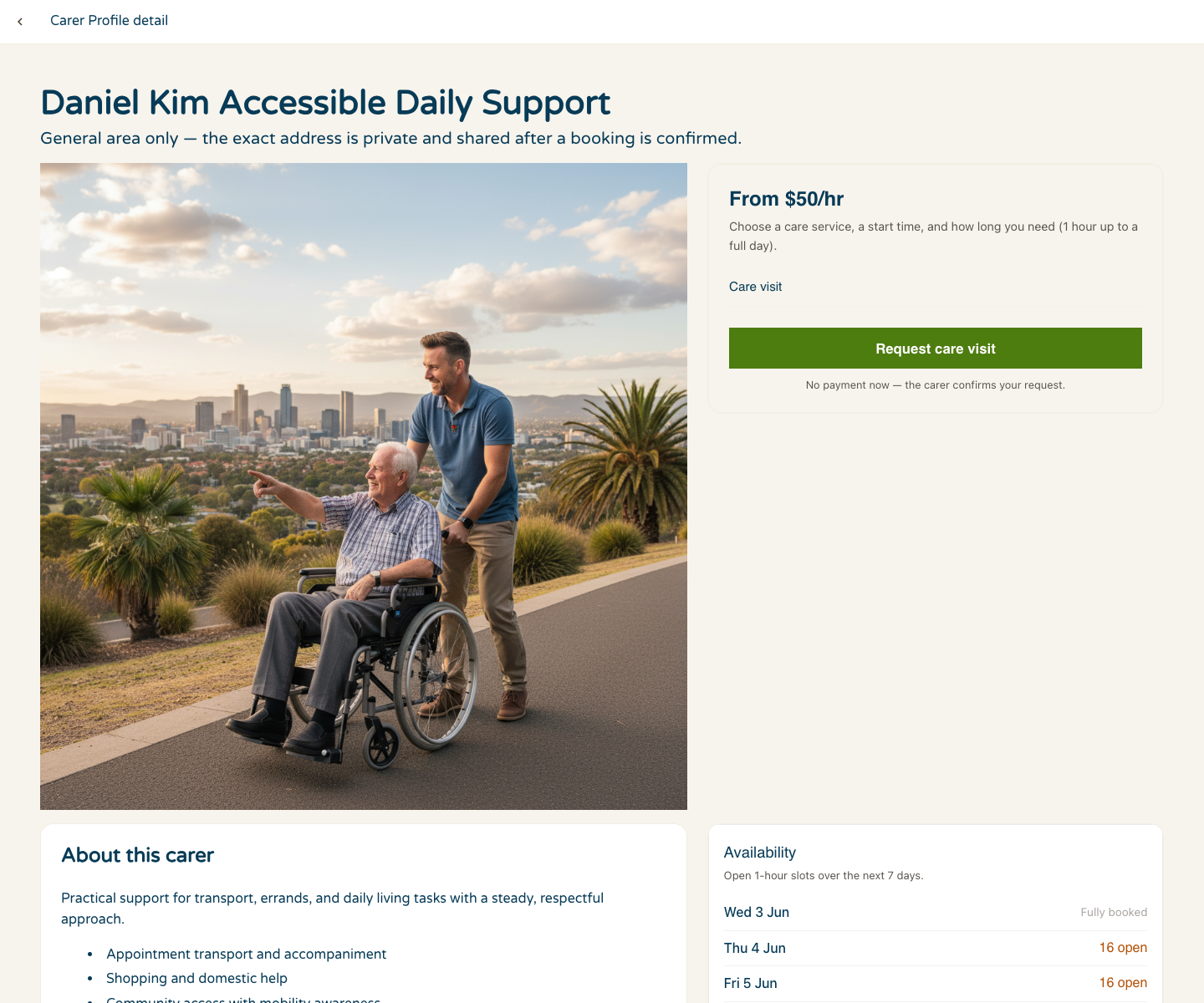
A Care Connect item opens into a carer profile detail page with a general area, private-address guidance, hourly pricing, care visit request action, and availability. The visible pattern is familiar, but the meaning and risk profile are different.
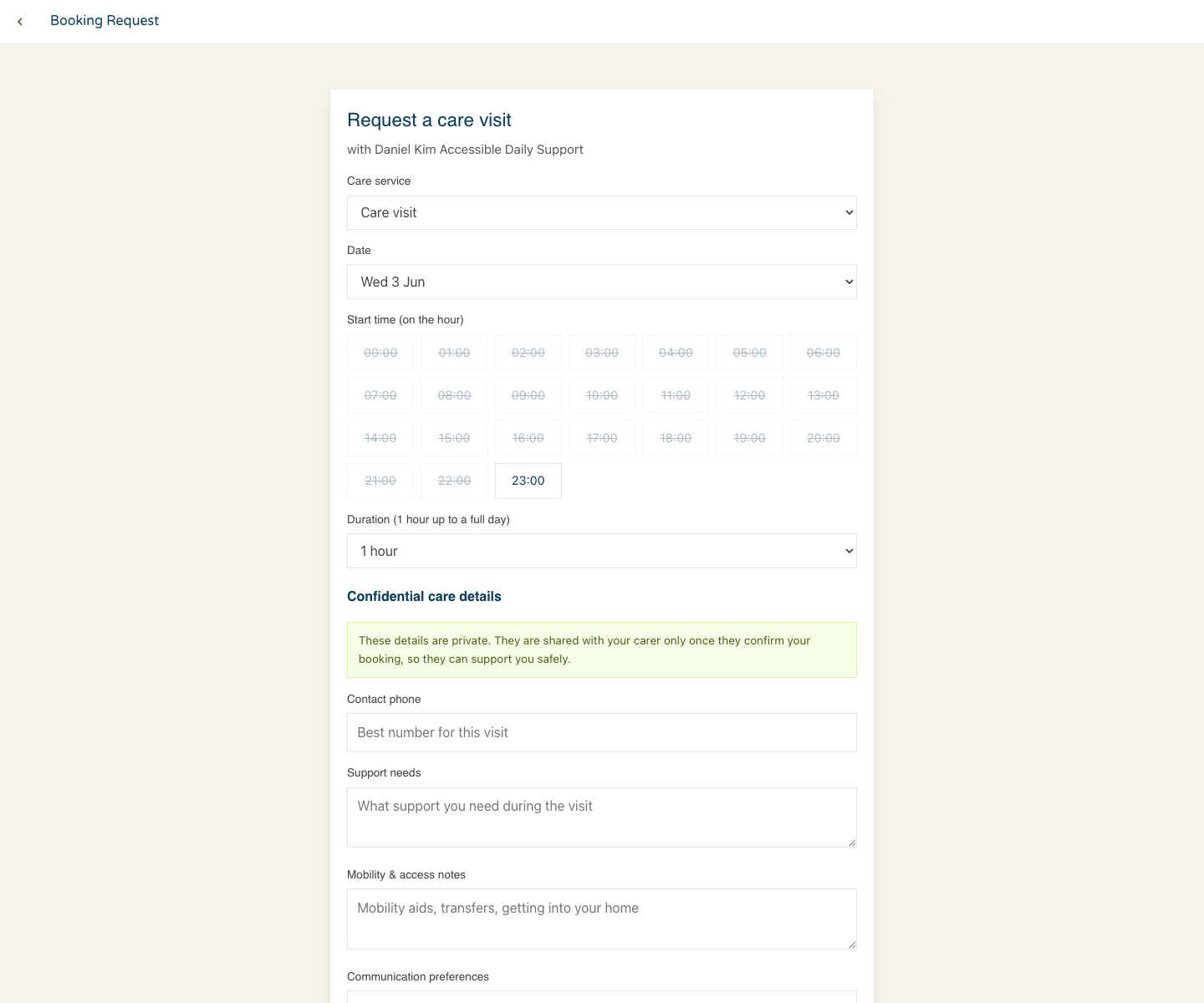
The booking request flow makes the domain change even clearer. Instead of choosing nights and guests for a property, the care flow asks for a care service, a date, an hourly start time, duration, and confidential care details that are shared only when appropriate.
Governance matters more in the care version
A care booking app is not just a rental marketplace with different labels. It can involve sensitive personal information, support needs, carer identity, scheduling, service records, and operational accountability. Those requirements need more than a polished first screen.
The Buzzy enterprise release material describes several pieces that matter here. Field-level privacy controls are generally available, giving teams explicit control over sensitive data across runtime, publications, editor views, and REST/MCP paths. Automated testing and the App Security Review Scanner are in beta, helping teams create repeatable tests, review access checks, identify security requirements, and apply fixes inside the editor.
That does not mean Buzzy automatically makes a care app legally compliant. Compliance still needs responsible configuration, legal review, security review, operational policy, and evidence. The practical advantage is that the app definition gives teams a clearer place to model, test, review, and govern those requirements.
Why this is different from generating code
AI code generation can be useful, but every generated codebase creates ownership work. Someone has to understand it, patch it, secure it, test it, and update it when dependencies, integrations, or business rules change.
The broader market is already seeing this tension. Gartner has forecast that most enterprise software engineers will use AI code assistants by 2028. Veracode reported that AI-generated code introduced security vulnerabilities in a large share of tested tasks. Harness has reported that heavy AI coding tool users can deploy faster while also seeing more deployment strain when AI-generated code is involved.
The lesson is not "do not use AI." The lesson is that the architecture matters. Buzzy Builder MCP uses the agent for high-level app definition work, while Buzzy provides the maintained engine and governed application layer. That keeps the speed of agentic development closer to the control point enterprises need.
A practical checklist for template-to-app work
Start from the closest working template, not the most generic prompt.
Map domain entities before asking an agent to change the app.
Separate visual copy changes from semantic changes to data, roles, booking logic, and access rules.
Use the MCP client to inspect and revise the app definition, not just to produce prose.
Test home, search, item, booking, admin, and permission paths early.
Treat sensitive data as a data-layer privacy problem, not only a UI hiding problem.
Run security and compliance guidance scans as part of iteration, not only after launch.
FAQ
What is Buzzy Builder MCP?
Buzzy Builder MCP is a Model Context Protocol capability that lets MCP-enabled development tools work with Buzzy app creation and app definition workflows. It is designed for building and refining semantic app definitions rather than generating standalone application codebases.
How is Builder MCP different from Custom MCP?
Builder MCP is for creating and editing Buzzy applications. It lets an MCP client work on the app definition itself: screens, data, workflows, roles, and behaviour.
Custom MCP adds MCP to an app you have already created, so an AI assistant can use that app's data and actions. For example, a recipe, meal planner, and shopping list app could let ChatGPT answer "what is on my meal planner tonight?", add a new recipe, or add ingredients to the shopping list. A CRM app could let an assistant discuss active deals, compare them with market context, prioritize the most important opportunities, and draft plans to close them.
Can teams still start from scratch?
Yes. Starting from scratch is useful when the workflow is novel. But when a close template exists, adapting that template can be faster because the core screens, data relationships, and workflow patterns are already present.
Does this replace security or compliance review?
No. It gives teams a clearer model to review. Security, privacy, and compliance still require responsible configuration, expert review, testing, and operational controls.
Related reading
References
YouTube: Empowering Enterprises with AI: The Next Leap in Semantic App Layers
GitHub Blog: Gartner positions GitHub as a Leader in the 2025 Magic Quadrant for AI Code Assistants
Business Wire: Veracode research on AI-generated code security risks
PR Newswire: Harness report on AI coding and DevOps maturity